Our products
Cafe for Mac
Cafe keeps your Mac awake for as long as you choose, from the menu bar. It’s free.
If the download doesn’t start, use this link. Download Cafe.dmg
Test mode: this form doesn’t send anything from here.
Jaume Sampol (mainlab) uses your email to send you the link, because you ask for it, and keeps it for 12 months. If you tick the box, we also send you news, with your consent, until you unsubscribe.
You can exercise your rights of access, rectification, erasure, objection, restriction and portability by writing to main@mainlab.es, as explained in our privacy policy.
The first time, if macOS blocks it: System Settings › Privacy & Security › Open Anyway.
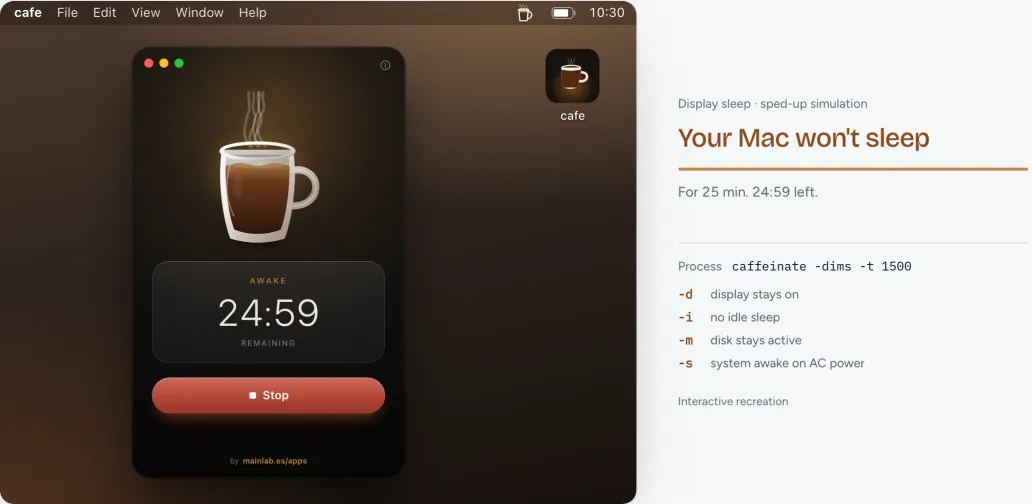
To save data, the demo only loads when you ask for it.
Set a time and press Keep Awake, as you would in the app.
What it does
Keeping your Mac awake, and nothing else.
As long as you choose
Hours and minutes with two controls. At 0:00, your Mac stays awake until you stop it.
A cup in the menu bar
While Cafe is on, a cup in the menu bar slowly empties. Its menu shows the time left.
Stops whenever you want
From the cup’s menu, with Stop (⌘.). When it ends, the cup disappears.
Built on caffeinate
It uses caffeinate, macOS’s own tool, to keep the display, the system and the disk awake.
Installation
Three steps.
Open the Cafe.dmg file you downloaded.
Drag Cafe to the Applications folder.
Open Cafe from Applications or with Spotlight.
The first time, if macOS blocks it: System Settings › Privacy & Security › Open Anyway.
Requires macOS 26 or later.
Privacy
Cafe collects no data.
The app doesn’t connect to the internet, includes no analytics and stores nothing on your Mac. It only runs caffeinate while it’s on.
The email you give us is used to send you the download link, and we keep it for 12 months. If you agree to receive news about new mainlab apps, we keep it until you unsubscribe. You can ask us to delete it at any time by writing to main@mainlab.es.
Questions about Cafe?
Write to us at main@mainlab.es.
We also make TalAIot, AnyAction and a few smaller tools.
See our products